WhatsApp and Signal shrink your photos, even with HD on
WhatsApp's HD and Signal's High quality both send a smaller, re-encoded copy of each photo, and the date and place it was taken usually don't survive. What a family group chat loses, and the privacy trade-offs of each app.
After a birthday or a long weekend, the photos usually end up in a group chat. Someone starts "Grandma's 80th", everyone drops in what they took, and that chat becomes the family's record of the day.
It's quick, and everyone already has the app. But what lands in the chat isn't the photo you took, and the HD switch doesn't change that as much as its name suggests.
What Signal sends
Signal is open source, so you can read exactly what its iPhone app does to a photo before it leaves your phone.
- At Standard quality, the photo is scaled down to at most 2,048 pixels on its longest side and has to fit in 1.5 MB. In some countries Standard is lower still: 1,600 pixels and 1 MB.
- At High quality, the limits go up to 4,096 pixels and 3 MB.
- Either way, a photo from your camera is converted to JPEG at 55 to 60 percent quality, and everything except its orientation is stripped out: the camera details, the time it was taken and the place.
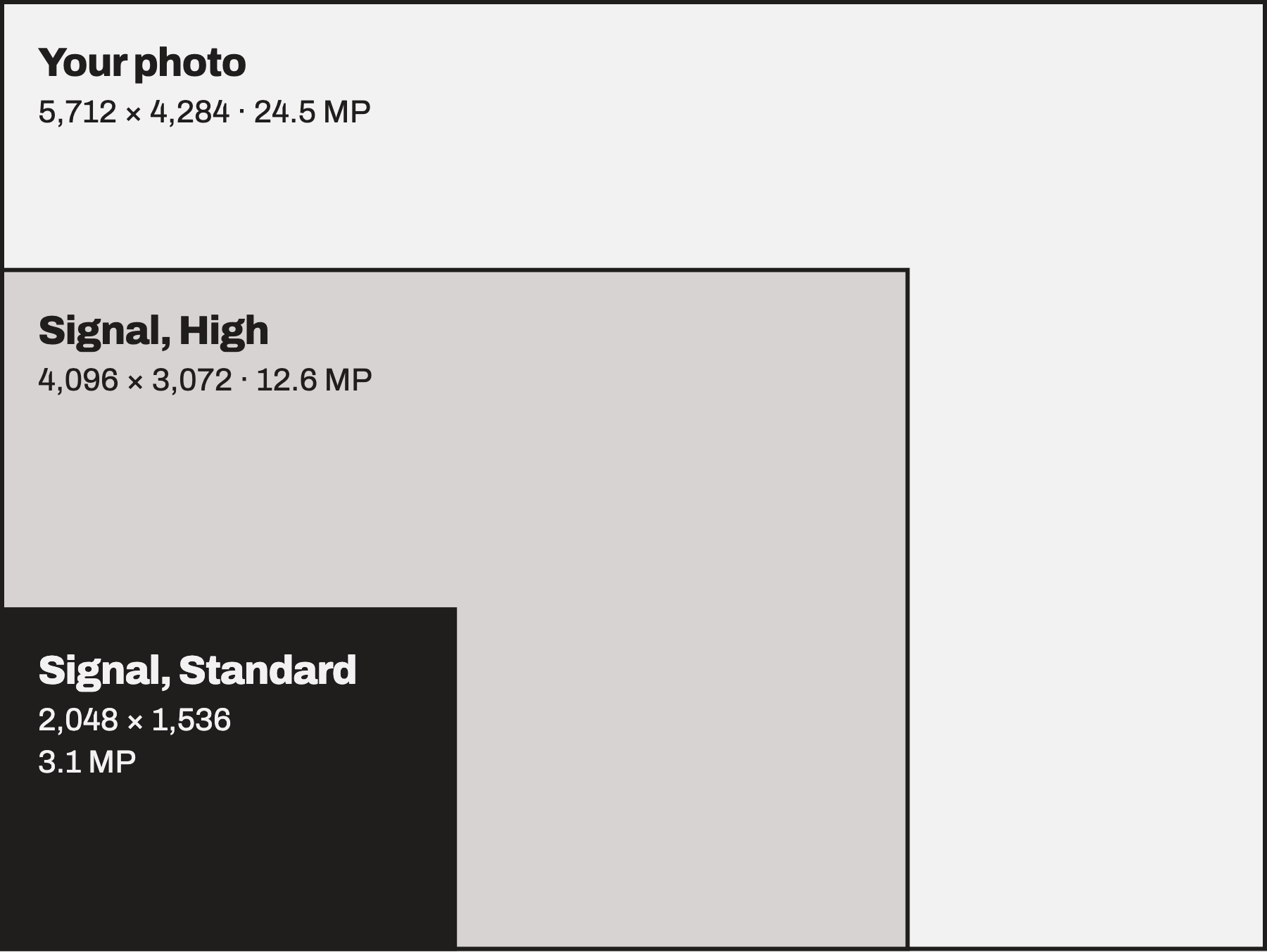
The iPhone 15 and later take 24-megapixel photos by default, 5,712 by 4,284 pixels. The most Signal's High setting will send of that is 4,096 by 3,072, about half the pixels. Standard sends at most 2,048 by 1,536, about an eighth.
What WhatsApp sends
WhatsApp doesn't publish its photo limits, and people who've measured them report different numbers. Its help centre does say plainly that "media files are usually compressed when shared". HD gives you a bigger, sharper copy than Standard, but it's still a re-encoded copy rather than your original file, and by most accounts the date and location don't come with it.
Video has clearer numbers. WhatsApp's help centre puts the default limit at 720p and 100 MB on a fast connection, or 480p and 64 MB on a slow one. A 4K video has nine times as many pixels as 720p.
There is a way around it. Send the photo as a document and WhatsApp sends the original file, up to 2 GB. But it arrives as a file attachment, not a photo, and everyone in the chat has to open each one and save it to Photos themselves.
Side by side
For one 24-megapixel photo from an iPhone:
| Sent with | Largest it arrives | File | Date and place |
|---|---|---|---|
| Signal, Standard | 2,048 px on the long side | JPEG | Removed |
| Signal, High | 4,096 px on the long side | JPEG | Removed |
| WhatsApp, HD | Not published | Re-encoded copy | Usually removed |
| WhatsApp, as a document | Original size | Original file | Kept, but not saved to Photos |
| OliDrop | Original size | Original file | Kept |
Why it matters more in a group
The chat copy becomes the family copy. If eight people are in the chat, eight people have the reduced version. The original exists only on the phone that took it, and if that phone is lost or cleared out, the best surviving copy is the one in the chat.
The timeline breaks. Without the original date, a photo saved from the chat usually lands in Photos under the day it was saved. The grandparents' library ends up with the whole weekend filed under the following Tuesday, and none of it on the map.
Saving is everyone's job. Photos stay in the chat until each person saves them. WhatsApp can save to your camera roll automatically, for one chat or for all of them, but then every screenshot, meme and blurry pocket shot comes along too.
The privacy side
The two apps make opposite trade-offs.
WhatsApp encrypts messages and photos end to end, so Meta can't see the pictures. It does see a lot around them: your phone number, which groups you're in and who else is in them, and when you use the app. In a group, everyone can normally see your phone number, including people who don't have it saved. WhatsApp began rolling out usernames in 2026 to change that, but anyone who already has your number still sees it, and Meta still has it.
Backups are the quieter gap. A WhatsApp backup to iCloud is only end-to-end encrypted if you turn that on and protect it with a passkey or password. In a group, your photos are only as private as the least careful member's backup.
Signal is built to know as little about you as possible. Messages and photos are end-to-end encrypted, and by default your phone number isn't shown to people who don't already have it saved. Stripping a photo's metadata is part of the same design: those details can include exactly where the photo was taken, and that's worth removing before a picture goes to strangers. In a family chat, it's the part you wanted to keep. And you still need a phone number to sign up, so getting the grandparents onto Signal starts with getting them onto another messaging app.
How to check your own photos
Send a photo to yourself, or to someone who'll send it back, and save it from the chat. Open it in Photos and swipe up to see its size in pixels and megabytes, the camera it came from, and the date and place. Then compare it with the original.
What OliDrop does instead
I built OliDrop after we forgot to swap photos with my in-laws before they went home. It sends the original file in its original format, metadata included, and saves it straight into everyone's Photos library, so the weekend shows up on the right days. There's no phone number, email or password: you make a room for the family and share its code.
Sources
- WhatsApp Help Center, How to send media, contacts, or location: compression, video limits, documents up to 2 GB and Save to Camera Roll.
- WhatsApp Help Center, About end-to-end encrypted backup.
- Signal for iPhone source code, as of October 2026: ImageQuality.swift for the size limits and NormalizedImage.swift for the JPEG conversion and metadata.
- Signal Support, Phone Number Privacy and Usernames.
- BleepingComputer, WhatsApp rolls out usernames to help users hide their phone number.
WhatsApp and Signal are trademarks of their respective owners. OliDrop isn't affiliated with WhatsApp, Meta or Signal.